The Daily Card
The Daily Card is the core of StarCards — one is automatically created for you each day and lives at the top of your Dashboard. It's where you capture what happened, how you felt, what you got done, and what you're planning next.
One Card Per Day
StarCards creates exactly one daily card per day. You don't need to do anything to start it — it's waiting for you when you open the app. Find it in two places:
- Dashboard — the Today's Card widget at the top of the page
- Sidebar — Active Daily in the navigation
Each card's title is automatically set from the date. You don't name daily cards manually.

The Star Shape
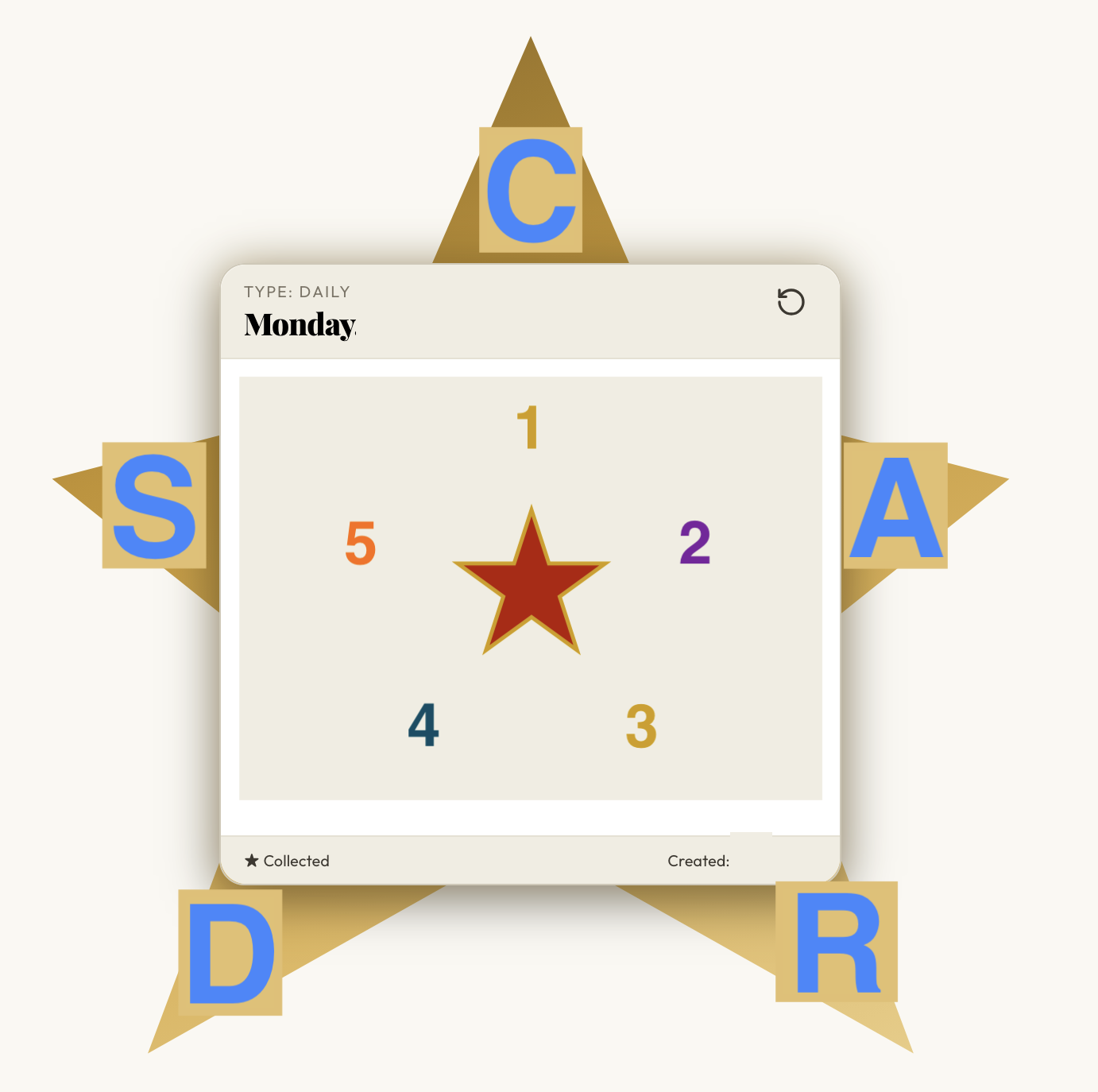
Every card is shaped like a five-pointed star. Each point is interactive and serves a specific purpose — together they spell CARDS:
| Point | Letter | What it holds |
|---|---|---|
| Top center | C | Card Info — title, description, metadata |
| Top right | A | Attachments — files and links |
| Bottom right | R | Related — Star Tags, related cards, type details, and the day's tasks |
| Bottom left | D | Decks — assign the card to Decks |
| Top left | S | Settings & Share — archive toggle and sharing |
For a detailed breakdown of each point, see Filling Your Card.
Front and Back
Cards can be flipped to reveal a back side. Tap or click the flip control to rotate the card — the animation shows the card turning over. The front and back surfaces give you more room to work without cluttering a single view.
The Daily Template
Daily cards come pre-structured with a set of prompts built into the description field: Headlines, Personal Events, Feeling Score (0–9 for both mood and productivity), Tomorrow's Intentions, Notes Log, and Gratitude. You can fill in as much or as little as you like.
When the day is done, you can collect and lock the card to preserve it.
Keyboard Shortcuts
- ← / → — navigate to the previous or next card
- ↑ / ↓ — cycle through the card's five star points
- Esc — save and close an open panel